Tenant and Onboarding
Every service the EDK ships is multi-tenant. The issuer, verifier, AS, DID resolver, and KMS containers each run as a single process that serves any number of tenants. The tenant is the unit that scopes routing, authorization, persistence isolation, and configuration: a request is resolved to a tenant before anything tenant-scoped runs, and from that point on every read, write, signing key, and advertised URL is bound to that tenant.
This section is for the developer or operator who deploys the EDK, onboards tenants, calls the admin APIs, and customises behaviour. It covers the tenant model that matters at the API surface, the registration journeys that land a tenant in the system, the order in which a request is matched to a tenant, the URLs a tenant advertises, per-tenant configuration and secrets, and the isolation guarantees.
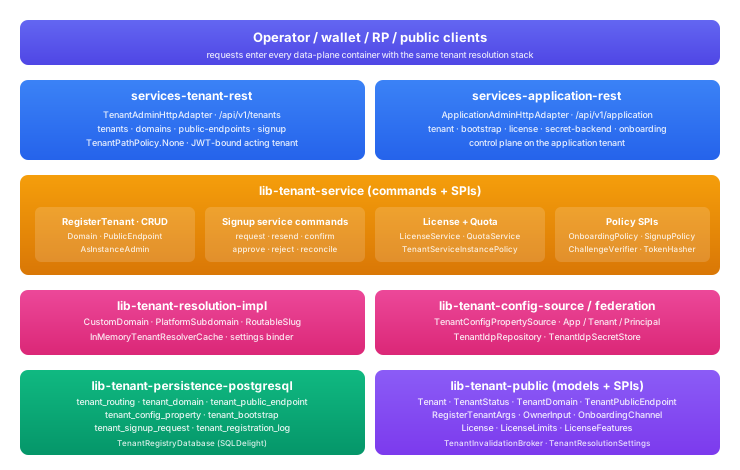
What the Tenant Subsystem Gives a Deployment
The tenant subsystem provides multi-tenant request routing (matching an incoming request to the right tenant), per-tenant configuration and secret storage, per-tenant isolation of data and signing keys, the four registration journeys that bring a tenant into existence, and a Platform Admin API for managing tenants, domains, public endpoints, federation, and onboarding policy. Everything below the API is wired automatically by the runtime; a consumer interacts with it through the REST surface and a handful of configuration keys.
The Tenant Model
A tenant carries the fields a multi-tenant deployment needs to route, scope, and license:
- A slug: a globally unique, URL-safe label (lowercase, hyphen-separated, matching
^[a-z][a-z0-9-]{0,62}$, no consecutive hyphens). The slug doubles as the platform subdomain label and as a path segment in protocol URLs. - A parent (
parentTenantId):nullfor a root tenant, or the id of a parent for a child tenant. The hierarchy scopes administration and licensing, not data sharing. - A status:
ACTIVE(reachable),SUSPENDED(registered but the resolver rejects requests), orPENDING_VERIFICATION(registered but a required step such as owner email verification or a domain DNS challenge is still outstanding). - A system flag: marks a tenant as not a customer tenant. System tenants are excluded from default listings and from slug- and parent-based resolution.
Each tenant has zero or more domains (a platform subdomain of the form <slug>.<platform-base>, auto-created and verified at registration; and customer custom domains the tenant brings and verifies by DNS) and zero or more public endpoints, one per service type, that say what URLs the tenant advertises for its issuer, verifier, and authorization server. See Tenant Model and Domains and Public Endpoints.
Registration Journeys
A tenant comes into existence through one of four journeys. All four converge on the same atomic registration that validates the slug and owner, sets up routing and isolation, provisions the default authorization server, creates the owner account, and mints a one-time owner invitation token. The journeys differ only in how the caller proves it is allowed to register:
- Admin direct creation. An authenticated admin posts to
/tenantsand the tenant is created immediately. The only journey that works with no email service configured. See Registration Journeys. - Admin invite by email. Same as direct creation, except the owner invitation token is sent to the owner as an activation email. Requires an email service. See Registration Journeys.
- Self-service signup. A prospective owner requests a tenant through the public signup endpoint, verifies their email, optionally waits for operator approval, and the tenant is registered. Requires an email service and the
self-signuplicense feature. See Registration Journeys. - Bootstrap. The one-shot first-tenant claim on a fresh deployment, gated by a durable database flag. See Application Tenant and Bootstrap.
License gates apply across all journeys: maxRootTenants, maxTotalTenants, maxHierarchyDepth, subtenantsAllowed, and the subtenants / self-signup / custom-domains / federation feature flags. Without a license service installed, registration is unconstrained. See License, Quota, and Policy.
Tenant Resolution
Every request is matched to a tenant in a fixed order: the bearer JWT's tenant claim first (the only signal that proves who the caller acts for), then a verified custom domain, then a platform subdomain, then a tenant slug in the URL path. The first signal that resolves wins. A service advertises only the URLs explicitly bound for the resolved tenant; it never falls back to the request host. See Tenant Resolution.
Application Tenant
One tenant administers the deployment itself: it activates the license, selects the secret backend, configures onboarding policy and the email service, and registers tenants. It always keeps a hosted authorization server so the operator can sign in even when a customer's external IdP is broken. See Application Tenant and Bootstrap.
What This Section Covers
- Onboarding Walkthrough. The ordered runbook to stand up a deployment and onboard a tenant.
- Application Tenant and Bootstrap. The tenant that administers the deployment, license activation, secret backend selection, and onboarding policy.
- License, Quota, and Policy. License limits and features, what they gate, and the extension points that decide who may register.
- Registration Journeys. The four ways a tenant lands in the system and the signup state machine.
- Owner Activation. How a new tenant's owner redeems the invitation token and signs in.
- Tenant Federation. How a tenant configures platform-hosted or external OIDC sign-in.
- Domains and Public Endpoints. Platform subdomains, custom domains and DNS verification, and the per-service URL bindings.
- Instance Deployment. Binding a tenant's issuer, verifier, and AS to its public URLs.
- Tenant Model. The tenant shape, status lifecycle, hierarchy, slugs, and system tenants.
- Tenant Resolution. The order a request is matched to a tenant and the well-known URL forms.
- Per-Tenant Configuration. Per-tenant config and secret references and the App / Tenant / Principal scope chain.
- Tenant Isolation. Row-level vs database-per-tenant isolation, per-tenant signing keys, encryption at rest, and admin scope.
What This Section Does Not Cover
- Running more than one issuer, verifier, or AS per tenant. The EDK runs at most one of each per tenant; multiple instances per tenant is a VDX capability.
- Operator dashboards and UIs. The EDK exposes the REST API; the UI is a layer above.