Tenant Model
The tenant is the central entity in the EDK. Every record that is not deployment-wide (configuration, integrations, credential designs, DCQL queries, AS clients, federation providers, signing key aliases, webhooks, sessions, audit events) belongs to exactly one tenant. The fields below are the ones that matter when you create, list, and manage tenants through the Platform Admin API.
Slugs
The slug is a globally unique, URL-safe label. It does a lot of work:
- It is the platform subdomain label.
acmeis reachable atacme.<platform-base>. - It is the path segment for path-based routing.
/acme/oid4vci/...resolves to theacmetenant. - It appears in the
.well-knownURL forms for OID4VCI (/.well-known/openid-credential-issuer/acme), OAuth AS metadata (/.well-known/oauth-authorization-server/acme), and OIDC Discovery (/acme/.well-known/openid-configuration).
Because slugs are globally unique, any tenant is reachable by direct subdomain regardless of where it sits in the hierarchy: tenantc.saas.com resolves to tenantc even when tenantc is a child of tenanta. Service-specific labels such as issuer, verifier, or auth may sit to the left of the tenant slug without changing the result: issuer.tenantc.saas.com still resolves to tenantc.
Validation rules:
- Length 1 to 63 characters (the DNS label limit).
- Character set
[a-z0-9-], must start with[a-z]. - No consecutive hyphens.
- A small reserved-word denylist (
admin,api,www,system, plus deployment-specific entries an operator can extend).
Slugs are globally unique. The admin API rejects a collision with a 409.
Hierarchy
A tenant is either a root (parentTenantId = null) or a child pointing at its parent. The hierarchy is used for two things:
- Administration scope. A parent tenant's admin sees and manages its child tenants; a child tenant's admin sees only its own resources.
- License limits.
maxHierarchyDepthcaps how deep the tree can go (a root is depth 1, one child is depth 2, and so on).
The hierarchy does not share data. A child tenant's configuration, integrations, signing keys, designs, queries, and sessions are independent of the parent's. Registration walks the proposed parent's ancestry and refuses a cycle or a tree deeper than maxHierarchyDepth before any change is made.
Status Lifecycle
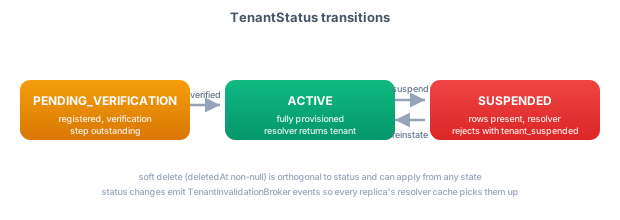
ACTIVE. Fully provisioned. The resolver returns the tenant; admin and protocol surfaces work.SUSPENDED. The tenant's records remain (no data loss), but the resolver rejects requests with atenant_suspendederror. Use it to disable a tenant without deleting its data, for example during a billing dispute, a security incident, or a manual hold.PENDING_VERIFICATION. Registered, but a required verification step (owner email verification, a custom-domain DNS challenge, or another deployment-specific gate) is still outstanding. The resolver returns the tenant so the verification flow can run, but commands gated by verification refuse until it clears.
Change a tenant's status with PATCH /api/platform-admin/v1/tenants/{tenantId}/lifecycle/status. The change propagates to every service replica without a restart, so resolution reflects it immediately. Soft delete is separate from status: a soft-deleted tenant disappears from listings and from resolution while its data remains in storage. Hard delete is not exposed through the API.
System Tenants
A system tenant is marked as not a customer tenant. System tenants:
- Are excluded from tenant listings by default (pass an explicit flag to include them).
- Are not returned by slug- or parent-based resolution.
- Do not count toward
maxRootTenantsormaxTotalTenants(those limit customer tenants only).
The EDK does not assign any privilege to the flag; it is a marker that higher layers and operators use for their own administration patterns. The application tenant that administers an EDK deployment is a system tenant. The flag is set only at registration; there is no API to convert a customer tenant into a system tenant afterward, so tenant counts do not change meaning under the operator's feet.
Audit Fields
Every tenant carries createdAt/createdById, updatedAt/updatedById, and deletedAt/deletedById. The *ById fields name the principal who performed the operation, derived from the calling JWT. For a self-service signup registration, the creator is a synthetic signup principal (the owner does not exist as a principal at registration time). Every admin operation also emits a structured audit event carrying the tenant id, the principal, the operation, the result, and the relevant business identifiers.