Application Tenant and Bootstrap
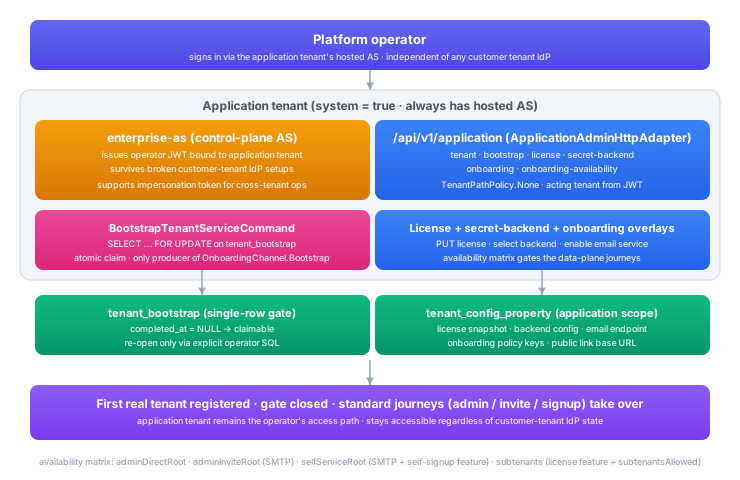
Every EDK deployment has exactly one application tenant. It is the tenant the operator signs in to in order to configure the deployment itself: inspect the installed license, choose the secret backend, configure the email service and onboarding policy, and register tenants.
The application tenant differs from a customer tenant in three ways:
- It always has a hosted authorization server. Even after a customer tenant configures its own external IdP, the application tenant keeps its hosted AS so the operator can sign in to fix a broken external-IdP setup without becoming locked out.
- It is the only tenant that can claim the one-shot bootstrap. Once claimed, the bootstrap is permanently closed.
- It is a system tenant, so it is excluded from default tenant listings and from slug- or parent-based resolution.
The application admin API lives at /application under the Platform Admin API on the AS image. The request and response shapes for every operation below are documented interactively in the Platform Admin API reference.
Why a separate application tenant
A production deployment separates the operator running the deployment from the tenant operating their issuer, verifier, or AS. The two have different scope. The operator can touch every tenant, while a tenant touches only its own. They have different authentication. The operator never depends on a customer's IdP, while a customer can configure any IdP. They have different failure modes. A misconfigured customer IdP breaks that tenant, not the operator's ability to fix it. Modelling the operator's access as its own tenant keeps those distinctions consistent. The operator signs in through the application tenant's hosted AS, holds a JWT bound to the application tenant, and acts on other tenants through the platform-admin role rather than a back-channel bypass.
The bootstrap
A fresh deployment has no platform tenant yet. The platform tenant is created or reconciled through a one-shot bootstrap, gated by a durable flag in the database so the first-run setup can be claimed only once even if two operators try at once. Once the platform tenant and operator login exist, the bootstrap is closed and tenants are created through the regular registration journeys.
The bootstrap is gated for good once claimed. There is no API to reopen it, because it is not a routine operation. A self-hoster rebuilding a deployment from a database backup can reopen the gate with a direct SQL update on the tenant_bootstrap row (set completed_at back to NULL), so the platform tenant can be converged again without manual surgery. This is the only place a self-hoster touches that table directly.
Read the bootstrap state with GET /application/tenant (getApplicationTenant). It reports whether the gate is still open. Open means the platform tenant bootstrap is still available. Closed means the platform tenant already exists. See the reference for the full snapshot.
Application admin API
The application admin API is mounted at /application under the Platform Admin API. The application tenant is implicit. The acting tenant always comes from the JWT.
GET    /application/tenant                    # getApplicationTenant
POST   /application/tenant/bootstrap          # bootstrapApplicationTenant

GET    /application/license                   # getApplicationLicense
PUT    /application/license                   # putApplicationLicense
POST   /application/license/verify            # verifyApplicationLicense

GET    /application/secrets/backend           # getSecretBackend
PUT    /application/secrets/backend           # putSecretBackend

GET    /application/onboarding                # getApplicationOnboarding
PUT    /application/onboarding                # putApplicationOnboarding
GET    /application/onboarding/availability   # getApplicationOnboardingAvailability
Tenant bootstrap
GET /application/tenant returns the bootstrap status plus the application tenant's id, slug, and primary domain when set. POST /application/tenant/bootstrap creates or reconciles the application tenant and hosted AS, claiming the bootstrap gate when needed. Tenant registration happens afterwards through the regular /tenants endpoint.
A container deployment can also converge the application tenant from configuration at startup, idempotently on every boot. application.tenant.id names the application tenant, application.tenant.hosted-as.issuer sets the hosted authorization server issuer, and application.tenant.owner.email with application.tenant.owner.display-name seed the operator owner identity.
License
The license decides what the rest of onboarding can do. Its signed claims carry a grant, the entitlement authority, composed of four parts:
- Products: the licensed products and editions the customer holds (for example the Enterprise Development Kit, enterprise edition).
- Features: the resolved feature map. Each licensed feature key is mapped to its typed value (enabled, a quota number, or a configuration string).
- Quotas: the quota map. Each quota key is mapped to its limit, kind, and window.
- Command overrides: the definitive per-command allow and deny rules layered over the coarse feature grants.
The grant is fully resolved before it is signed, so the runtime uses the signed feature set directly. The grant is bound to a specific installation through the installationId in the license's installation binding, so a license issued for one deployment cannot be replayed against another.
The admin API never exposes the grant itself. It exposes a sanitized status projection: the effective status (ACTIVE, GRACE, RECOVERY, MISSING, INVALID, EXPIRED, or BLOCKED), one summary per licensed product (product, edition, licensed module names, and quota projections), the customer id and installationId, the issuer, the hex SHA-256 fingerprint of the leaf signing certificate, the expiry instant with days to expiry, the recovery and grace flags, and warnings. Each quota projection carries the hard limit, the current usage, the metering window for metered quotas, and an at-cap flag, so the admin console can render capacity meters and disable Create when a cardinality cap is reached. The projection exposes nothing else: not the raw license token, not the decoded claims, not the entitlement graph, and not command-override patterns. Entitlement and quota decisions read the full grant internally. The projection reports only enough for an operator to see whether the deployment is licensed, for which products, how much of each quota is used, and when the license expires. The exact wire shape is in the Platform Admin API reference.
Signup, subtenant, and tenant-count gating is enforced from the licensed entitlements, and the availability endpoint reports each journey's evaluated state. Until a valid license is installed, the availability endpoint reports root-tenant registration, self-signup, and subtenant creation as blocked.
Activate a license by submitting the signed license token with PUT /application/license (putApplicationLicense). The response is the status projection of the installed license. Read the projection of the active license with GET /application/license (getApplicationLicense). Check a token without installing it with POST /application/license/verify (verifyApplicationLicense), which returns whether the token is valid plus its projection.
Container deployments may provide the installed license service with a mounted license envelope instead of treating the REST call as the only source. In that setup the service reads its envelope, recipient key, and trust bundle from configured file paths during runtime startup and exposes the same projection through GET /application/license. Secret material stays in the deployment's secret backend or Kubernetes objects. The admin API reports only the sanitized status projection. The license.* configuration keys and the trust model are documented in License, Quota, and Policy.
Without a license service installed, a bare EDK build runs with no entitlement ceiling, so the standard surface is available for local development. A production deployment installs a license service that reads the actual signed license and resolves the grant the customer holds. See License, Quota, and Policy.
Secret backend
The secret backend decides where per-tenant secrets (IdP client secrets, SMTP passwords, webhook signing keys) are stored. Secrets are write-only. A value goes in once, and only an opaque reference is stored and returned. Nothing reads a secret back out. The backend choices:
azure-key-vault: store secrets in Azure Key Vault. Use this on Azure.hashicorp-vault: store secrets in HashiCorp Vault. Use this for a Vault-centric or cloud-neutral deployment.kubernetes-secret-mount: read secrets that Kubernetes mounts into the pod as files.config-system-dev-only: keep secrets in the config system. Local and development only, never production, because the config system is not a secret store.
Set or reconfigure the backend with PUT /application/secrets/backend (putSecretBackend) and read the current selection with GET /application/secrets/backend (getSecretBackend). The non-secret configuration (Vault address, Key Vault URL, namespace) travels in the request. The credential the backend itself needs is a secret reference the deployment seeds at startup.
The backend choice gates production onboarding. The availability endpoint reports invite and self-service signup journeys as blocked until a non-dev backend is selected, so a deployment cannot accidentally store tenant IdP secrets, SMTP passwords, or webhook signing keys in the config system.
Onboarding
The onboarding policy is the set of toggles that decide which registration journeys exist on this deployment: root-tenant creation, admin invite, self-service signup, subtenant signup, and whether a journey requires operator approval. It also carries the email service binding and the public link base URL the invite and signup emails use.
Read the policy with GET /application/onboarding (getApplicationOnboarding) and update it with PUT /application/onboarding (putApplicationOnboarding). Updates propagate to every service replica without a restart.
A toggle being on does not mean the journey is usable. GET /application/onboarding/availability (getApplicationOnboardingAvailability) returns the evaluated result, combining the policy with the license features and limits, email readiness, and the secret backend selection. Each journey reports whether it is enabled and, when not, a reason. A self-service subtenant journey can be on yet blocked because the subtenants license feature is absent, or an invite journey can be blocked because no email service is configured. The admin UI uses this endpoint to decide which journey buttons to show, hide, or show with a "blocked because ..." note.
The bootstrap sequence
Standing up the application tenant on a fresh deployment, end to end:
- Containers come up. The platform service starts against the platform database; AS, KMS, DID, Issuer, and Verifier start against the tenant workload database with schema-per-tenant routing. The setup gate is open.
- License request. The setup API creates a signed local license request with the installation base domain, deployment owner/operator data, KMS-held key, and local instance certificate.
- License activation. The operator receives a license from the issuer, installs it through the setup API, and enables platform bootstrap.
- Platform bootstrap. The setup API creates or reconciles the application tenant, hosted AS, natural-person operator identity, protected email identifier, and credential, then closes the setup gate.
- Operator sign-in. The operator signs in through the platform-integrated AS and receives a token with platform-admin scope.
- Secret backend and policy. The operator PUTs the backend to
/application/secrets/backend, configures onboarding policy through/application/onboarding, and optionally configures email. - Tenants. Tenants come in through
/tenants(admin direct or admin invite) or the public signup endpoint. The setup gate is no longer involved.
When the operator risks a lockout
The application tenant is designed to stay usable in degraded states:
- Customer external IdP misconfigured. A customer's IdP setup is broken and their users cannot sign in. The operator signs in through the application tenant's hosted AS, fixes the customer's federation provider, and the customer is unblocked. The application tenant's access does not depend on any customer's IdP.
- License expired. New registrations are blocked, but the application tenant remains accessible regardless of license state, so the operator can upload a renewed license.
- Secret backend unreachable. Existing operations continue against cached secrets where possible. New secret writes fail. The operator switches backends or restores connectivity.
- Email service down. Invite and signup journeys fail fast with a clear error, but admin direct creation still works, so the operator can bring up new tenants without waiting for email to recover.