Operate a federation
A federation operator runs the Trust Anchor that every Trust Chain in the federation ends at. In VDX your organization can operate several federations, each with its own Trust Anchor entity. You publish the anchor's Entity Configuration, admit members by signing Subordinate Statements over keys you reviewed, set the metadata policies members receive, issue Trust Marks, and keep every signed statement renewed.
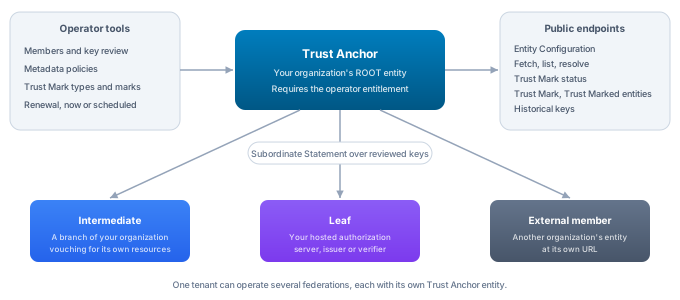
All steps happen in the Hosted federations area of OpenID Federation. Administration operations are listed in the OpenID Federation API reference; paths below are relative to /api/platform/config/v1/tenants/{tenantId}/openid-federation.
The operator entitlement
Running a federation as Trust Anchor is a platform decision, not a tenant setting. The platform operator grants it by setting the tenant configuration property oidfed.operator.enabled to true for your tenant. Without it you can still create the federation records, but publishing the Trust Anchor's Entity Configuration is refused because the tenant is not entitled to operate a federation.
The entitlement is only needed for Trust Anchors. Your organization can act as an intermediate for its own branches and services, and can take part in other federations, without it.
Create a federation
Under Federations you operate, choose New federation and fill in:
- Federation name, the name shown in the console.
- Trust Anchor Entity Identifier, the HTTPS URL members and relying parties resolve your anchor at. Its Entity Configuration is served at this URL plus
/.well-known/openid-federation, so choose a URL on a domain that routes to the platform for your tenant. Relying parties will configure this value as their trust anchor, so treat it as permanent. - Organization ID, the organization that operates the federation. The console suggests organizations that already back a federation entity.
Create federation creates the Trust Anchor entity with the role Trust anchor, binds it to the organization, creates a federation that expects this anchor, and lets the anchor take part in it. Nothing is published yet. The federation then appears in the list with its Trust Anchor and the number of members; Manage opens it.
A federation counts as hosted when its expected Trust Anchor is one of your own Trust anchor entities. You can create as many as your federations need, for example a production federation and a test federation, or federations for separate sectors.
API: the console composes POST /entities (createOpenIdFederationEntity), POST /bindings (createOpenIdFederationBinding), POST /contexts (createOpenIdFederationContext) and POST /participations (createOpenIdFederationParticipation).
Publish the Trust Anchor
In the federation's detail, the Entity Configuration panel shows whether the anchor is published. Under Signing keys, choose an Algorithm, Create key and Use for signing, then Publish Entity Configuration.
The anchor publishes federation_entity metadata from the organization record (name, contact, website and privacy policy) together with the federation endpoints the platform serves at the anchor's URL: fetch, list, resolve, Trust Mark status, Trust Mark listing, Trust Mark and historical keys. Once Trust Mark types are defined, the configuration also lists them under trust_mark_issuers.
Publish again whenever the panel reports that the anchor changed since publication, for example after defining a Trust Mark type or editing the organization record. The previous revision stays valid until it expires.
Hand the Trust Anchor Entity Identifier to relying parties and wallets that should trust your federation. They load the anchor's keys from its Entity Configuration, and may pin them if their policy requires it. Inside VDX, a tenant trusts your federation by adding the anchor to a Trust Domain as an OpenID Federation entity anchor; see Join a federation.
API: POST /entities/{entityId}/keys (createOpenIdFederationEntityKey), PUT /entities/{entityId}/keys/selection (selectOpenIdFederationEntitySigningKey), POST /entities/{entityId}/publish (publishOpenIdFederationEntity).
Admit members
A member is admitted when the anchor signs a Subordinate Statement about it. The statement vouches for the member's Federation Entity Keys, so the central decision is whether the keys you are about to sign are really the member's.
Entity onboarding describes the whole exchange with the joining party. Prospective members send you their onboarding details out of band: their Entity Identifier, the URL of their Entity Configuration and the Key IDs of their Federation Entity Keys. A member on VDX finds them in its entity's Joining a federation section.
Under Members, enter the Member Entity Identifier and choose Add member. The member can be an entity of your own organization, such as a branch intermediate or a hosted credential issuer, or an external entity that publishes its own Entity Configuration. Adding the member only declares the relationship; its Statement column reads Not signed.
Choose Review keys. The console shows the keys the member publishes right now, read from its published Entity Configuration in your tenant for your own entities, or from its Entity Configuration at its own URL for external ones, together with a fingerprint of the key set. Compare the keys with the Key IDs the member sent you. A mismatch means someone else may control the URL, or the member rotated keys without telling you; resolve it with the member before you sign.
Optionally enter Constraints as JSON, for example max_path_length to limit how deep a member that is an intermediate may delegate, or allowed_entity_types. Then choose Sign statement. VDX signs the statement over exactly the keys you reviewed. If the member's keys changed between your review and the signature, signing is refused and you review again. The member's row then shows Signed with the statement's expiry, and the member can verify its admission.
API: GET /superiors/{edgeId}/statement/preview (previewOpenIdFederationSubordinateStatement), POST /superiors/{edgeId}/statement (publishOpenIdFederationSubordinateStatement), GET /entities/{entityId}/subordinates (listOpenIdFederationSubordinateStatements). The statement operation takes the reviewed key fingerprint as expectedSubjectKeysFingerprint.
Set metadata policies
Metadata policies let the anchor constrain what members may claim, per Entity Type. Under Metadata policies, enter the Entity Type, for example openid_relying_party or openid_credential_issuer, and the Policy as JSON claim operators. The supported operators are value, add, default, one_of, subset_of, superset_of and essential. A policy that restricts relying parties to the authorization code grant, for example, puts subset_of with authorization_code on grant_types.
Save policy validates the policy and rejects malformed operators. Leaving the policy empty and saving removes it. The policy is signed into every Subordinate Statement the anchor issues, so members receive a change with the next statement signed about them.
API: GET /entities/{entityId}/policies (getOpenIdFederationMetadataPolicies), PUT /entities/{entityId}/policies/{entityType} (setOpenIdFederationMetadataPolicy).
Issue Trust Marks
Trust Marks are signed claims the anchor makes about a member, for example that it passed a certification or follows a sector agreement. Relying parties can require them in addition to a valid Trust Chain.
First define the types the anchor issues. Under Trust Marks, enter a New Trust Mark type as an https or urn URI and choose Define type. Then publish the Entity Configuration again so the type is listed under trust_mark_issuers. Remove withdraws a type the anchor no longer issues.
To issue a mark, choose the Trust Mark type, enter the member's Entity Identifier and how many days it is Valid for, then choose Issue Trust Mark. A lifetime ranges from one minute to two years. Issued marks are listed under Issued Trust Marks with their entity and expiry. Revoke ends a mark before it expires; from then on the anchor's Trust Mark status endpoint reports it as revoked to anyone who checks.
API: POST /entities/{entityId}/trust-mark-types (defineOpenIdFederationTrustMarkType), GET /entities/{entityId}/trust-mark-types (listOpenIdFederationTrustMarkTypes), DELETE /entities/{entityId}/trust-mark-types/{trustMarkTypeId} (removeOpenIdFederationTrustMarkType), POST /entities/{entityId}/trust-marks (issueOpenIdFederationTrustMark), GET /entities/{entityId}/trust-marks (listOpenIdFederationTrustMarks), POST /entities/{entityId}/trust-marks/{trustMarkId}/revoke (revokeOpenIdFederationTrustMark).
What members and relying parties can call
Once the anchor is published, the platform answers the OpenID Federation protocol endpoints at the anchor's own URL. They need no credentials, because they only return signed, public statements. Errors follow the JSON error format of the specification.
The fetch endpoint returns the Subordinate Statement the anchor signed about the entity named in sub. The list endpoint lists the anchor's subordinates and can filter by entity_type, by whether they are intermediates, and by Trust Mark (trust_marked, trust_mark_type). The resolve endpoint returns resolved metadata and a Trust Chain for an entity, but only for entities inside the subtree the anchor itself serves; it is not an open discovery service for arbitrary URLs.
For Trust Marks, the Trust Mark status endpoint accepts a Trust Mark by form POST and returns a signed status response that says whether the mark is active, expired, revoked or invalid. The Trust Marked entities endpoint lists the entities holding a given Trust Mark type, and the Trust Mark endpoint returns the current mark of a type for a subject. The historical keys endpoint publishes the anchor's retired keys as a signed JWK Set, so statements signed before a key rollover can still be checked.
Intermediates you operate inside your own organization serve the same endpoints at their own URLs for the statements they sign. The request and response details are in the EDK guide Operate a federation.
Renew statements
Every Entity Configuration and Subordinate Statement expires; deployments ship a lifetime of one hour. Renewal signs them again before they lapse. Entity Configurations are signed again from current facts. Subordinate Statements are signed again only over the keys you confirmed when you signed them; a member that changed its keys is reported as The subordinate publishes different keys. Review and sign its statement again. Its old statement runs out, and it stays out of the federation until you review its new keys and sign again. Renewal only touches what is already published and still live: an entity that was never published is not published by renewal, and statements for suspended or ended member relationships are left to expire.
The Renewal section sits below your federations and covers every entity your tenant publishes, including entities that only take part in other federations:
- Renew statements expiring within (minutes) sets the window. Statements that expire within it are signed again.
- Check every (minutes) sets how often a schedule runs. It must be at least one minute and shorter than the window, so no statement lapses between runs.
Renew now runs one renewal immediately and reports how many Entity Configurations and Subordinate Statements were renewed, listing any that failed with the reason. Renew automatically registers a recurring renewal on the platform scheduler and confirms the cadence. With the shipped one hour lifetime, a check every few minutes with a 30 minute window, which the console proposes as five and thirty, keeps every statement valid with a wide margin. Registering the same cadence again returns the existing schedule rather than adding a second one.
Recurring renewal is a VDX platform capability. Services without a recurring scheduler, such as EDK enterprise images, refuse to register a schedule; renew there on request, or run the renewal step from a scheduled workflow.
API: POST /publications/refresh (refreshOpenIdFederationPublications, with renewWithinSeconds), PUT /renewal-schedule (ensureOpenIdFederationRenewalSchedule, with intervalSeconds and renewWithinSeconds).
Put approvals around federation operations
The workflow designer offers an OpenID Federation category with five steps: Publish Entity Configuration, Sign Subordinate Statement, Verify admission, Issue Trust Mark and Renew statements. Each step runs the same authorized operation as the console and the API, with the same checks, so a workflow adds review and approval around an operation without opening a second way to perform it.
A typical admission workflow collects the onboarding request through a form, asks a reviewer to compare the member's keys with what it submitted, and continues with Sign Subordinate Statement for the superior relationship, its version and the reviewed key fingerprint. Because the fingerprint is part of the step, the statement can only cover the keys the reviewer approved. In the same way, a certification workflow can end in Issue Trust Mark, and a scheduled workflow can run Renew statements on deployments without the platform scheduler.
See Operations & Management for the workflow engine and the Workflow Authoring API reference for defining workflows.