Onboard members and clients
Two kinds of onboarding happen in an OpenID Federation, and they are easy to confuse. Entity onboarding brings an organization or service into a federation: the joining party publishes itself and a superior signs a statement about it. Client onboarding lets a relying party that is already a federation member use one of your authorization servers without being registered there by hand. The first is a process between two operators. The second runs automatically once you have decided which federations' clients a server accepts.
This page describes both as end-to-end processes. The console steps are detailed in Join a federation and Operate a federation; the protocol detail is on the EDK pages linked below.
Entity onboarding
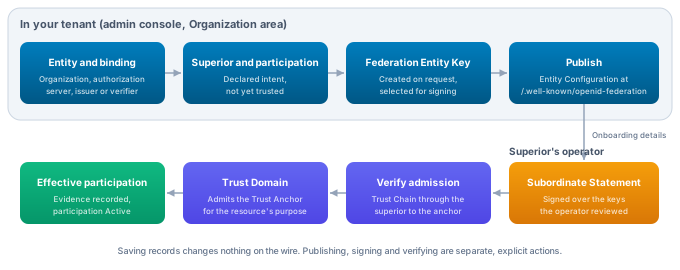
OpenID Federation defines how a superior vouches for an entity, but not how the entity asks to be vouched for. There is no join endpoint. VDX therefore treats onboarding as a short exchange between the joining party and the operator of the superior, with a review in the middle that only a person can do: confirming that the keys about to be signed belong to the party that asked.
1. The joining party prepares and publishes
The joining party sets up its side in the Organization area of OpenID Federation. It creates the federation with the expected Trust Anchors, an entity for each organization or service it wants admitted, and a binding from each entity to its resource. It declares the superior it joins under and the participation that superior carries. Then it creates a Federation Entity Key, selects it for signing and publishes the Entity Configuration.
Publishing first matters: the operator will read the keys from the published Entity Configuration, and the configuration names the chosen superior in its authority_hints.
API: createOpenIdFederationContext, createOpenIdFederationEntity, createOpenIdFederationBinding, createOpenIdFederationSuperior, createOpenIdFederationParticipation, replaceOpenIdFederationParticipationSuperiors, createOpenIdFederationEntityKey, selectOpenIdFederationEntitySigningKey and publishOpenIdFederationEntity in the OpenID Federation API reference.
2. The joining party sends its onboarding details
After publication, the entity's Entity details panel shows Joining a federation with the Entity Identifier, the Entity Configuration URL and the Federation Entity Keys by Key ID. The joining party sends these through the channel the federation asked for, for example its onboarding form or a support request. Sending the Key IDs separately from the Entity Configuration is what lets the operator detect a URL that someone else controls.
3. The operator adds the member and reviews its keys
The operator opens the federation under Hosted federations, Manage, and under Members enters the Member Entity Identifier and chooses Add member. This only declares the relationship.
Review keys shows the keys the member publishes right now and a fingerprint of that key set. The operator compares them with the Key IDs from step 2. When they differ, the operator stops and resolves it with the joining party before going on.
API: createOpenIdFederationSuperior with the anchor as superior, then previewOpenIdFederationSubordinateStatement.
4. The operator signs the statement
With the keys confirmed, the operator optionally enters Constraints such as max_path_length, then chooses Sign statement. VDX signs the Subordinate Statement over exactly the reviewed key set and applies the anchor's metadata policies. If the member's keys changed after the review, signing is refused. The member's row shows Signed with the statement's expiry, and the statement is now served from the anchor's fetch endpoint.
This is also the moment to issue Trust Marks the federation requires, under Trust Marks, Issue Trust Mark, for the member's Entity Identifier.
API: publishOpenIdFederationSubordinateStatement with expectedSubjectKeysFingerprint, issueOpenIdFederationTrustMark.
5. The joining party verifies admission
When the operator confirms, the joining party opens the superior relationship in Records, Superiors, and chooses Verify admission. VDX resolves the Trust Chain through that superior to the Trust Anchor, verifies it and records the superior's statement as evidence. The participation becomes Active once a Trust Domain that governs the resource's purpose admits the Trust Anchor; see Make participation effective.
API: verifyOpenIdFederationSuperior.
6. Both parties keep it current
Every statement in the chain expires, by default after one hour. Each party renews what it signed: the joining party its Entity Configuration, the operator its statement about the member. A recurring renewal handles both; see Renew statements.
Key rotation needs both parties again. The joining party creates the new key and sends its Key ID before switching signing to it. Renewal never extends the operator's statement to keys it did not review: it reports the member with The subordinate publishes different keys. Review and sign its statement again., and the operator repeats steps 3 and 4.
To remove a member, the operator ends the relationship in the Organization area under Records, Superiors, with End superior, or suspends it. Ended and suspended relationships are not renewed, so the last statement stays valid until it expires and then disappears from the chain. The same applies when a joining party ends its own participation or entity. Revoking a Trust Mark takes effect at once for anyone who checks its status.
The EDK guides describe both sides at API level: Join an existing federation and Operate a federation.
Client onboarding on a hosted authorization server
OpenID Federation for OpenID Connect 1.1 lets a relying party that is a federation member use an OpenID Provider without registering with it first. The provider trusts the relying party because its Trust Chain leads to a Trust Anchor the provider accepts, and takes the client metadata from the chain. Automatic Registration does this during the authorization request, sometimes referred to as federation dynamic client registration. Explicit Registration does it through a registration request before the first authorization. A hosted VDX authorization server supports both.
Decide which federations' clients the server accepts
A server accepts federation clients only when its tenant says from which Trust Anchors. That decision lives in a Trust Domain, like every other trust decision in VDX:
- In Trust domains, open or create the domain for federation clients, go to Anchors and choose Add anchor. Pick the Anchor type OpenID Federation entity and enter the Trust Anchor's Entity identifier (https URL). Add one anchor per federation whose relying parties you accept. The anchor's keys are read from its own Entity Configuration, so there is nothing else to paste.
- Admit each anchor for client admission, the admission class
CLIENT, withputTrustAnchorAdmission. - Attach the domain to the authorization server for the usage
CLIENT_REGISTRATION_TRUST, with consumer kindASand the authorization server's resource ID as consumer, usingputTrustAttachment. This usage only allows the strict admission mode. The console's attachment editors do not offer it yet, so this step is an API call.
The anchor operations and the attachment are in the Trust Domain API reference. Without an attachment, or with an attachment whose domains contain no OpenID Federation anchors, the server accepts no federation clients and behaves as before.
Give the server a federation entity and publish it
Relying parties discover registration support from the server's federation metadata, so the server needs an entity of its own. Create an entity whose Entity Identifier is the server's issuer URL, bind it to the authorization server with the OpenID provider role (and Authorization server if you also want OAuth 2.0 metadata), create and select a key, and publish. When the server has a CLIENT_REGISTRATION_TRUST attachment, its published metadata advertises client_registration_types_supported with automatic and explicit, the federation_registration_endpoint at the Entity Identifier plus /federation_registration, and private_key_jwt for Pushed Authorization Requests in request_authentication_methods_supported.
Publish again after you add or remove the attachment, so the metadata matches. The server also needs to be a member of the federations whose clients it serves, so relying parties can resolve its own Trust Chain; onboard it as described in Entity onboarding.
The server must be an active hosted authorization server. Federation client registration runs on the platform and enterprise tenant authorization server services, not in the single-process monolith.
Automatic Registration
A relying party uses its Entity Identifier as client_id. It authenticates with private_key_jwt using a key from its federation metadata and sends its authorization request as a signed Request Object through a Pushed Authorization Request.
When the server meets a client_id that is an https URL it does not know, it resolves the relying party's Trust Chain to one of the Trust Anchors its Trust Domains accept, verifies it and takes the relying party's metadata from the chain. If the chain holds, the relying party becomes a client for as long as the chain is valid: a confidential client that authenticates with private_key_jwt using the keys from its metadata, with the redirect URIs, grant types (default authorization code) and response types (default code) from its metadata. PKCE and Pushed Authorization Requests are required, and every Request Object can be used only once.
Automatic registrations are not stored. The server keeps the resolved client in memory until the chain expires and resolves it again afterwards, so a relying party that leaves the federation stops being accepted once its last chain expires, and a change to the accepted Trust Anchors applies to the next resolution, without any cleanup on your side.
Explicit Registration
Before its first authorization request, a relying party posts its Entity Configuration (application/entity-statement+jwt) or a Trust Chain that starts with it (application/trust-chain+json) to the server's federation_registration_endpoint. The server verifies the chain against its accepted Trust Anchors, registers the client and answers with a registration response signed with the server entity's selected Federation Entity Key. The client is registered as a confidential private_key_jwt client until the chain expires; registering again replaces the earlier registration.
The relying party's metadata must use private_key_jwt, publish its keys as jwks or jwks_uri, and list redirect URIs when it uses the authorization code grant. No client secrets are issued. When the server entity declares the OpenID provider role, the registration follows OpenID Connect; otherwise it follows OAuth 2.0.
Troubleshooting client onboarding
An Explicit Registration failure comes back to the relying party as a JSON error. invalid_trust_anchor with the description that the provider accepts no federation clients means the server has no CLIENT_REGISTRATION_TRUST attachment with OpenID Federation anchors. Other invalid_trust_anchor or invalid_trust_chain answers mean the relying party's chain does not reach an accepted anchor, or has expired. invalid_metadata or invalid_client_metadata point at the relying party's metadata, for example a missing key set or an authentication method other than private_key_jwt. not_found means the request did not reach an entity bound to an active hosted authorization server, usually because the entity is not published under that URL.
An Automatic Registration failure shows up to the relying party as an unknown client at the Pushed Authorization Request. The authorization server logs each refusal with the marker VDX_OIDFED_AUTOMATIC_REGISTRATION_REFUSED, the client_id and a reason, such as a chain that does not verify or no_redirect_uris when the relying party's metadata lists no redirect URIs. Search the authorization server's logs for that marker first.
In both cases, check in this order: the Trust Domain holds the federation's Trust Anchor as an OpenID Federation entity and admits it for clients, the domain is attached to this server for CLIENT_REGISTRATION_TRUST, the server's entity is published with current metadata, and the relying party is admitted in the federation with a statement that has not expired.
The EDK guide Accept federation clients on the authorization server covers the protocol exchange in more depth.